SprintPlus 4 is here! We are proud to launch the latest generation of our desktop version. SprintPlus 4 builds on SprintPlus.online, but combines this with the convenience of working offline on a Windows device. This allows you to enjoy a familiar look and feel alongside maximum flexibility.
SprintPlus 4 is based on SprintPlus.online and looks very similar. This ensures you can easily switch between both versions without feeling as though you are using two different versions.
By using Google Drive or OneDrive, you can share your documents quickly and easily with your teacher or support staff. Switching between SprintPlus 4 and SprintPlus.online is also seamless when both are linked to the drive.
Install SprintPlus 4
Install SprintPlus 4 using the button below. Anyone with an annual subscription, LeesVoor! Vlaanderen, a teacher’s pack or a support staff licence can access SprintPlus 4 using the same login details. Don’t forget that you must enter the administrator details if your computer is managed!
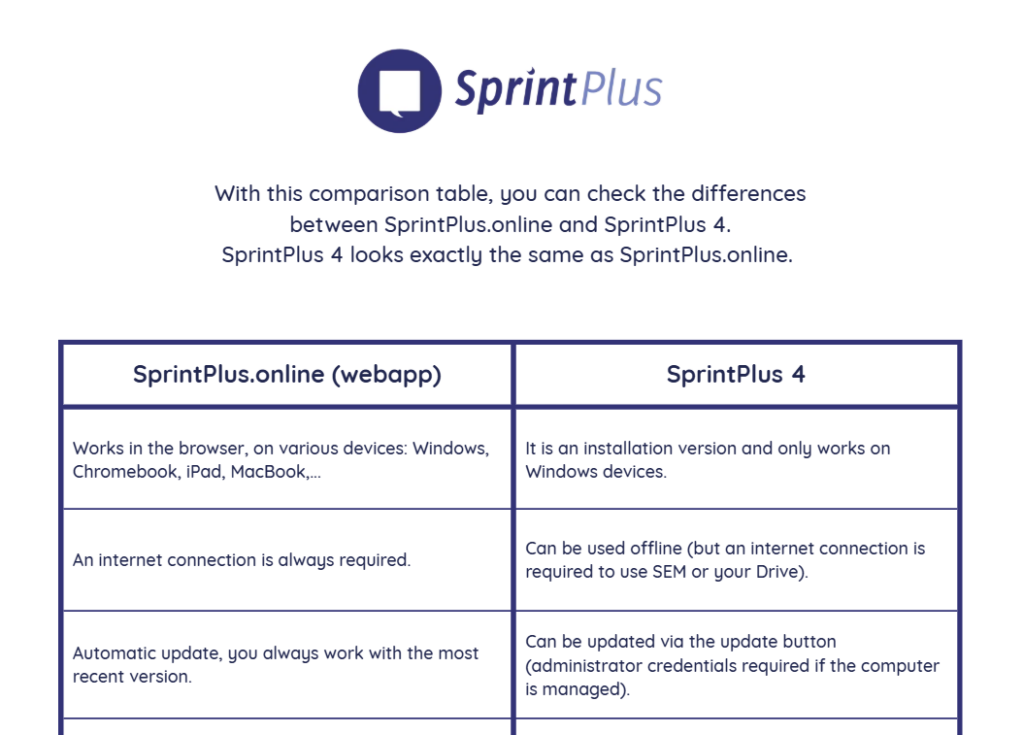
What is the difference between SprintPlus 4 and SprintPlus.online?
SprintPlus 4 is an installable version that can only be installed on a Windows device. You can use this version offline. SprintPlus.online works in the browser and requires a constant internet connection. There are a number of other differences between the two versions. We have listed these for you in this overview.
Are you currently using SprintPlus 3, but would you like to try out SprintPlus 4 as well? No problem. You can use both versions side by side without any issues. SprintPlus 4 is a separate programme and will not overwrite anything from SprintPlus 3. You do not need to uninstall SprintPlus 3 to try out the new version.
SprintPlus 3 will not stop working either. You can continue to work with SprintPlus 3 without any issues if you do not wish to switch. As SprintPlus 4 is now under active development, there will be no further major updates for SprintPlus 3.